Tag: digital filtering

Pulse Rate Monitor with Raspberry Pi

Pulse Rate Monitor with Raspberry Pi

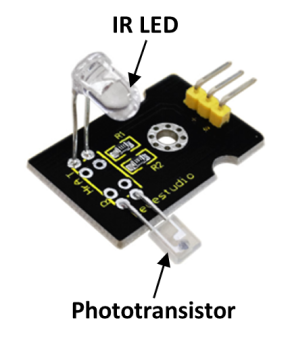
Pulse rate can be detected using a variety of physical principles. One way of doing it is by applying infrared light to one side of the tip of your finger and sensing the “output” on the other side with a phototransistor. The blood flow through the capillaries at the finger tip fluctuates with the same frequency (rate) of your pulse. That fluctuation can be detected after processing the signal captured by the sensor.

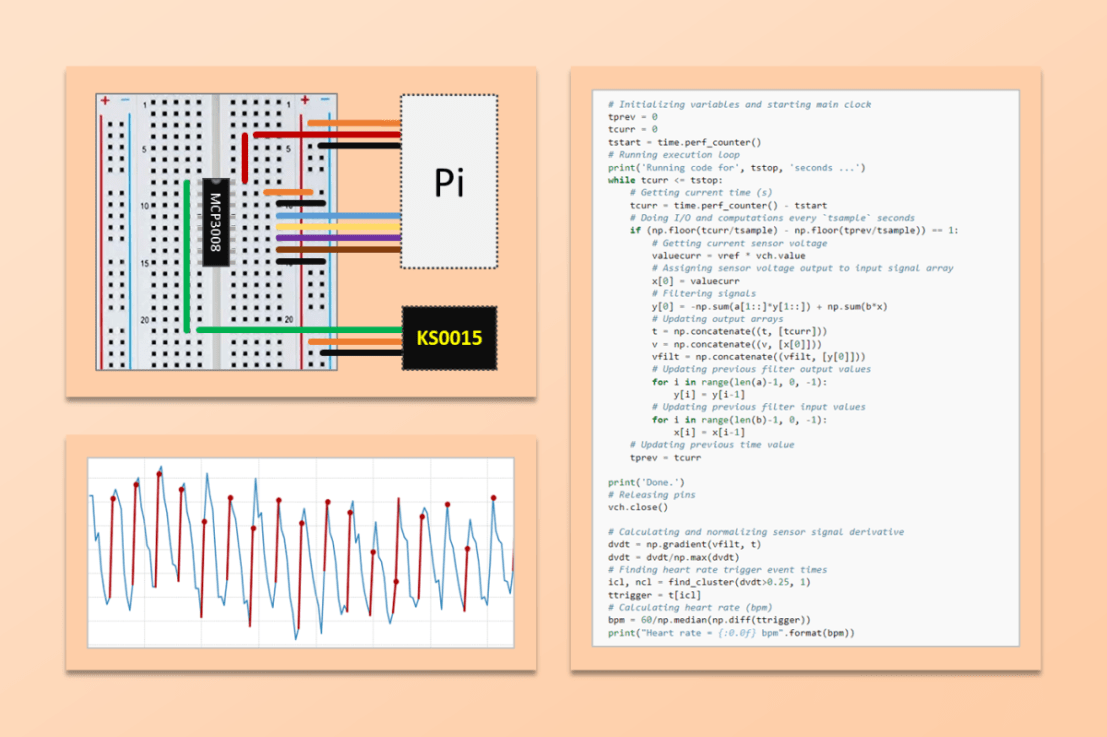
Keyestudio has a rudimentary pulse rate monitor (KS0015) that does the trick. In this post we will go over the signal processing and how to display the pulse rate in real time. Since the KS0015 outputs an analog signal, it has to be used with the MCP3008 analog-to-digital converter chip, as illustrated in the schematics below.
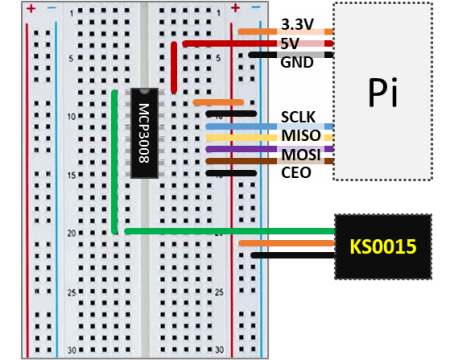
As noted in previous posts, adopting a reference voltage of 3.3V for the MCP3008 provides the best resolution for the analog-to-digital conversion. The sensor output therefore has to be no greater than 3.3V, which can be achieved by using 3.3 instead of 5V as the supply voltage for the KS0015.
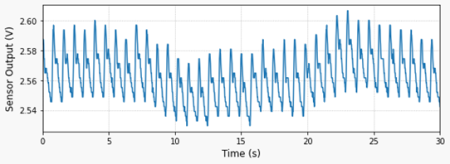
The very first thing to do is to look at the signal coming from the sensor as the tip of my index finger is placed between the IR LED and the phototransistor. The plot on the left can be generated by running the Python code below.

By inspecting the program, the first thing to observe is the sampling period (tsample) of 0.02 s. Since we don’t know much about the signal, it’s always good to start with a smaller value. The second thing is the wait time of 5 seconds before collecting any data. After tinkering around for a bit, I realized that the sensor is very sensitive to finger movements. Therefore, waiting for the signal to “settle down” really helps.

# Importing modules and classes
import time
import numpy as np
import matplotlib.pyplot as plt
from gpiozero import MCP3008


# Defining function for plotting
def make_fig():
    # Creating Matplotlib figure
    fig = plt.figure(
        figsize=(8, 3),
        facecolor='#f8f8f8',
        tight_layout=True)
    # Adding and configuring axes
    ax = fig.add_subplot(xlim=(0, max(t)))
    ax.set_xlabel('Time (s)', fontsize=12)
    ax.grid(linestyle=':')
    # Returning axes handle
    return ax


# Creating object for the pulse rate sensor output
vch = MCP3008(channel=0, clock_pin=11, mosi_pin=10, miso_pin=9, select_pin=8)

# Assigning some parameters
tsample = 0.02  # Sampling period for code execution (s)
tstop = 30  # Total execution time (s)
vref = 3.3  # Reference voltage for MCP3008
# Preallocating output arrays for plotting
t = []  # Time (s)
v = []  # Sensor output voltage (V)

# Waiting for 5 seconds for signal stabilization
time.sleep(5)

# Initializing variables and starting main clock
tprev = 0
tcurr = 0
tstart = time.perf_counter()
# Running execution loop
print('Running code for', tstop, 'seconds ...')
while tcurr <= tstop:
    # Getting current time (s)
    tcurr = time.perf_counter() - tstart
    # Doing I/O and computations every `tsample` seconds
    if (np.floor(tcurr/tsample) - np.floor(tprev/tsample)) == 1:
        # Getting current sensor voltage
        valuecurr = vref * vch.value
        # Assigning current values to output arrays
        t.append(tcurr)
        v.append(valuecurr)
    # Updating previous time value
    tprev = tcurr

print('Done.')
# Releasing GPIO pins
vch.close()

# Plotting results
ax = make_fig()
ax.set_ylabel('Sensor Output (V)', fontsize=12)
ax.plot(t, v, linewidth=1.5, color='#1f77b4')
ax = make_fig()
ax.set_ylabel('Sampling Period (ms)', fontsize=12)
ax.plot(t[1::], 1000*np.diff(t), linewidth=1.5, color='#1f77b4')

Digital Filtering and Pulse Detection

In this stage of the signal processing, let’s put some of the content of previous posts to good use. More specifically digital band-pass filtering and event detection for the pulse signal.

First let’s remove the low and high frequency components of the signal that are outside the band of interest. I chose 0.5 and 5 Hz (30 and 300 beats per minute) as the cutoff frequencies. That seems to be a reasonable bandwidth to account for the filter attenuation at the cutoff frequencies, as well as for the human heart “range of operation”.
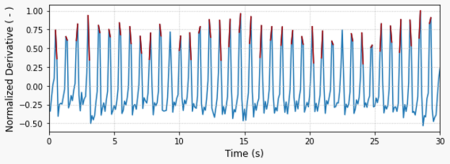
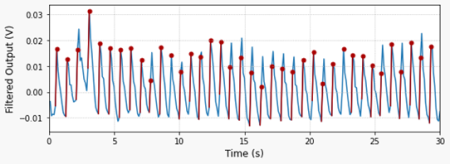
Then, let’s calculate the derivative of the signal so it’s easier to detect the pulse events. By normalizing the derivative based on its maximum value, the signal amplitude becomes more consistent and therefore a single value threshold can be used. In this case 25% of the maximum value.

The plot on the top shows the normalized derivative of the filtered signal. In red are the trigger events detected by the function find_cluster, which I placed inside the module utils.py . As usual, all the code for this post can be found on my GitHub page.

The plot on the bottom shows the identified trigger events (red dots) displayed on the filtered sensor output signal.

The Python program below is an extension of the one in the previous section, where the digital filter and the trigger detection features are now incorporated. The pulse rate is calculated using the median of the time difference between two consecutive trigger events. In this case, using the median instead of the mean is recommended since it makes the calculation more robust to outliers.

Running the code will generate the two graphs shown above and print the median pulse rate for the corresponding (30-second) data acquisition window. You will notice that the signal amplitude is fairly small (approx. 30 mV) and very sensitive to the finger tip location. It might take a few tries to find the correct position and pressure for the finger.

# Importing modules and classes
import time
import numpy as np
import matplotlib.pyplot as plt
from gpiozero import MCP3008
from utils import find_cluster


# Defining function for plotting
def make_fig():
    # Creating Matplotlib figure
    fig = plt.figure(
        figsize=(8, 3),
        facecolor='#f8f8f8',
        tight_layout=True)
    # Adding and configuring axes
    ax = fig.add_subplot(xlim=(0, max(t)))
    ax.set_xlabel('Time (s)', fontsize=12)
    ax.grid(linestyle=':')
    # Returning axes handle
    return ax


# Creating object for the pulse rate sensor output
vch = MCP3008(channel=0, clock_pin=11, mosi_pin=10, miso_pin=9, select_pin=8)

# Assigning some parameters
tsample = 0.1  # Sampling period for code execution (s)
tstop = 30  # Total execution time (s)
vref = 3.3  # Reference voltage for MCP3008
# Preallocating output arrays for plotting
t = np.array([])  # Time (s)
v = np.array([])  # Sensor output voltage (V)
vfilt = np.array([])  # Filtered sensor output voltage (V)

# Waiting for 5 seconds for signal stabilization
time.sleep(5)

# First order digital band-pass filter parameters
fc = np.array([0.5, 5])  # Filter cutoff frequencies (Hz)
tau = 1/(2*np.pi*fc)  # Filter time constants (s)
# Filter difference equation coefficients
a0 = tau[0]*tau[1]+(tau[0]+tau[1])*tsample+tsample**2
a1 = -(2*tau[0]*tau[1]+(tau[0]+tau[1])*tsample)
a2 = tau[0]*tau[1]
b0 = tau[0]*tsample
b1 = -tau[0]*tsample
# Assigning normalized coefficients
a = np.array([1, a1/a0, a2/a0])
b = np.array([b0/a0, b1/a0])
# Initializing filter values
x = [vref*vch.value] * len(b)  # x[n], x[n-1]
y = [0] * len(a)  # y[n], y[n-1], y[n-2]
time.sleep(tsample)

# Initializing variables and starting main clock
tprev = 0
tcurr = 0
tstart = time.perf_counter()
# Running execution loop
print('Running code for', tstop, 'seconds ...')
while tcurr <= tstop:
    # Getting current time (s)
    tcurr = time.perf_counter() - tstart
    # Doing I/O and computations every `tsample` seconds
    if (np.floor(tcurr/tsample) - np.floor(tprev/tsample)) == 1:
        # Getting current sensor voltage
        valuecurr = vref * vch.value
        # Assigning sensor voltage output to input signal array
        x[0] = valuecurr
        # Filtering signals
        y[0] = -np.sum(a[1::]*y[1::]) + np.sum(b*x)
        # Updating output arrays
        t = np.concatenate((t, [tcurr]))
        v = np.concatenate((v, [x[0]]))
        vfilt = np.concatenate((vfilt, [y[0]]))
        # Updating previous filter output values
        for i in range(len(a)-1, 0, -1):
            y[i] = y[i-1]
        # Updating previous filter input values
        for i in range(len(b)-1, 0, -1):
            x[i] = x[i-1]
    # Updating previous time value
    tprev = tcurr

print('Done.')
# Releasing pins
vch.close()

# Calculating and normalizing sensor signal derivative
dvdt = np.gradient(vfilt, t)
dvdt = dvdt/np.max(dvdt)
# Finding heart rate trigger event times
icl, ncl = find_cluster(dvdt>0.25, 1)
ttrigger = t[icl]
# Calculating heart rate (bpm)
bpm = 60/np.median(np.diff(ttrigger))
print("Heart rate = {:0.0f} bpm".format(bpm))

# Plotting results
ax = make_fig()
ax.set_ylabel('Normalized Derivative ( - )', fontsize=12)
ax.plot(t, dvdt, linewidth=1.5, color='#1f77b4', zorder=0)
for ik, nk in zip(icl, ncl):
    if ik+nk < len(t):
        ax.plot(t[ik:ik+nk], dvdt[ik:ik+nk], color='#aa0000')
ax = make_fig()
ax.set_ylabel('Filtered Output (V)', fontsize=12)
ax.plot(t, vfilt, linewidth=1.5, color='#1f77b4', zorder=0)
for ik, nk in zip(icl, ncl):
    ax.plot(t[ik:ik+nk], vfilt[ik:ik+nk], color='#aa0000')
    ax.scatter(t[ik+1], vfilt[ik+1], s=25, c='#aa0000')

Real-time Pulse Rate Detection

Now that we have the pulse rate detection and calculation working, we can modify the code from the previous section to add the real-time display of the pulse rate. For this step, we will use a 7-segment LED display with a TM1637 chip. In case you don’t have one, all the calls for the tm object in the code below should be removed and a simple

print("Heart rate = {:0.0f} bpm".format(bpm))

can be used to replace the code line

tm.number(int(bpm))

Also, notice how we are using a circular buffer (tbuffer) of 20 seconds that holds the signal for the pulse rate calculation. The buffer is updated every tsample seconds and the actual pulse rate calculation occurs every tdisp seconds. Through comparison with the previous program, you can see how the bpm calculation is now placed inside the execution loop, hence happening in real-time.

# Importing modules and classes
import time
import numpy as np
import matplotlib.pyplot as plt
import tm1637
from gpiozero import MCP3008
from utils import find_cluster


# Defining function for plotting
def make_fig():
    # Creating Matplotlib figure
    fig = plt.figure(
        figsize=(8, 3),
        facecolor='#f8f8f8',
        tight_layout=True)
    # Adding and configuring axes
    ax = fig.add_subplot(xlim=(0, max(t)))
    ax.set_xlabel('Time (s)', fontsize=12)
    ax.grid(linestyle=':')
    # Returning axes handle
    return ax


# Creating object for the pulse rate sensor output and LED display
vch = MCP3008(channel=0, clock_pin=11, mosi_pin=10, miso_pin=9, select_pin=8)
tm = tm1637.TM1637(clk=18, dio=17)

# Assigning some parameters
tsample = 0.1  # Sampling period for code execution (s)
tstop = 60  # Total execution time (s)
tbuffer = 20  # Data buffer length(s)
tdisp = 1  # Display update period (s)
vref = 3.3  # Reference voltage for MCP3008
# Preallocating circular buffer arrays for real-time processing
t = np.array([])  # Time (s)
v = np.array([])  # Sensor output voltage (V)
vfilt = np.array([])  # Filtered sensor output voltage (V)

# Waiting for 5 seconds for signal stabilization
time.sleep(5)

# First order digital band-pass filter parameters
fc = np.array([0.5, 5])  # Filter cutoff frequencies (Hz)
tau = 1/(2*np.pi*fc)  # Filter time constants (s)
# Filter difference equation coefficients
a0 = tau[0]*tau[1]+(tau[0]+tau[1])*tsample+tsample**2
a1 = -(2*tau[0]*tau[1]+(tau[0]+tau[1])*tsample)
a2 = tau[0]*tau[1]
b0 = tau[0]*tsample
b1 = -tau[0]*tsample
# Assigning normalized coefficients
a = np.array([1, a1/a0, a2/a0])
b = np.array([b0/a0, b1/a0])
# Initializing filter values
x = [vref*vch.value] * len(b)  # x[n], x[n-1]
y = [0] * len(a)  # y[n], y[n-1], y[n-2]
time.sleep(tsample)

# Initializing variables and starting main clock
tprev = 0
tcurr = 0
tstart = time.perf_counter()
# Running execution loop
tm.show('Hold')
print('Running code for', tstop, 'seconds ...')
print('Waiting', tbuffer, 'seconds for buffer fill.')
while tcurr <= tstop:
    # Getting current time (s)
    tcurr = time.perf_counter() - tstart
    # Doing I/O and computations every `tsample` seconds
    if (np.floor(tcurr/tsample) - np.floor(tprev/tsample)) == 1:
        # Getting current sensor voltage
        valuecurr = vref * vch.value
        # Assigning sensor voltage output to input signal array
        x[0] = valuecurr
        # Filtering signals
        y[0] = -np.sum(a[1::]*y[1::]) + np.sum(b*x)
        # Updating circular buffer arrays
        if len(t) == tbuffer/tsample:
            t = t[1::]
            v = v[1::]
            vfilt = vfilt[1::]
        t = np.concatenate((t, [tcurr]))
        v = np.concatenate((v, [x[0]]))
        vfilt = np.concatenate((vfilt, [y[0]]))
        # Updating previous filter output values
        for i in range(len(a)-1, 0, -1):
            y[i] = y[i-1]
        # Updating previous filter input values
        for i in range(len(b)-1, 0, -1):
            x[i] = x[i-1]
    # Processing signal in the buffer every `tdisp` seconds
    if ((np.floor(tcurr/tdisp) - np.floor(tprev/tdisp)) == 1) & (tcurr > tbuffer):
        # Calculating and normalizing sensor signal derivative
        dvdt = np.gradient(vfilt, t)
        dvdt = dvdt/np.max(dvdt)
        # Finding heart rate trigger event times
        icl, ncl = find_cluster(dvdt>0.25, 1)
        ttrigger = t[icl]
        # Calculating and displaying pulse rate (bpm)
        bpm = 60/np.median(np.diff(ttrigger))
        tm.number(int(bpm))
    # Updating previous time value
    tprev = tcurr

print('Done.')
tm.show('Done')
# Releasing pins
vch.close()
Joystick with Raspberry Pi

Joystick with Raspberry Pi

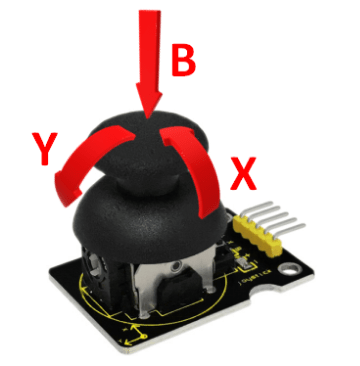
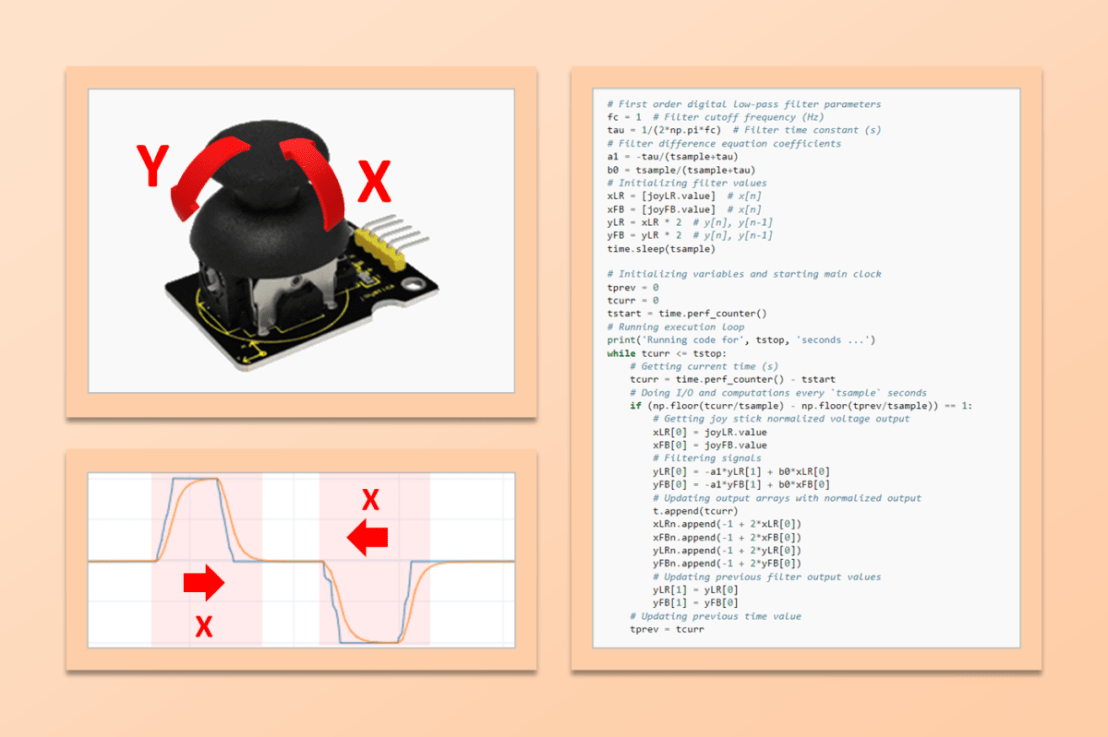
A two-axis joystick is an input device that can be used to simultaneously control two degrees of freedom of a system, such as roll and pitch on an aircraft, or the X and Y coordinates of a cartesian robot. The Keyestudio KS0008 joystick discussed in this post provides analog signals for the two axis (left-to-right and front-to-back), as well as a digital signal (downward). Like any analog input device used with the Raspberry Pi, the KS0008 requires the MCP3008 analog-to-digital converter chip.

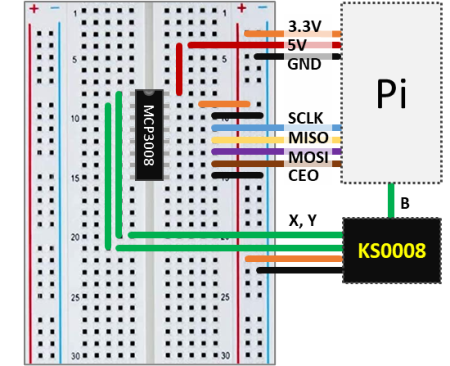
The wiring schematic shows how to connect the joystick to the Pi with the aid of the MCP3008. The analog outputs X and Y are wired to the channels 0 and 1 of the chip. The digital output B can be connected directly to any GPIO pin. In this configuration the KS0008 uses the 3.3V supply voltage. The Python code below samples and displays the three signals in an execution loop.

As a side note, I used the suffix LR (left-to-right) for the joystick’s X axis, and FB (front-to-back) for the Y axis. Mostly to avoid confusion with the digital filter input (X) and output (Y) used later in this post.

# Importing modules and classes
import time
import numpy as np
from gpiozero import MCP3008, DigitalInputDevice

# Creating objects for the joystick outputs
joyLR = MCP3008(channel=0, clock_pin=11, mosi_pin=10, miso_pin=9, select_pin=8)
joyFB = MCP3008(channel=1, clock_pin=11, mosi_pin=10, miso_pin=9, select_pin=8)
joyB = DigitalInputDevice(18)
# Assigning some parameters
tsample = 0.02  # Sampling period for code execution (s)
tdisp = 0.5  # Output display period (s)
tstop = 30  # Total execution time (s)
vref = 3.3  # Reference voltage for MCP3008

# Initializing variables and starting main clock
tprev = 0
tcurr = 0
tstart = time.perf_counter()
# Running execution loop
print('Running code for', tstop, 'seconds ...')
while tcurr <= tstop:
    # Getting current time (s)
    tcurr = time.perf_counter() - tstart
    # Doing I/O and computations every `tsample` seconds
    if (np.floor(tcurr/tsample) - np.floor(tprev/tsample)) == 1:
        # Getting joy stick normalized voltage output
        valLRcurr = joyLR.value
        valFBcurr = joyFB.value
        # Calculating current time raw voltages
        vLRcurr = vref*valLRcurr
        vFBcurr = vref*valFBcurr
        # Getting the Z axis state
        Bcurr = joyB.value
        # Displaying output voltages every `tdisp` seconds
        if (np.floor(tcurr/tdisp) - np.floor(tprev/tdisp)) == 1:
            print("X = {:0.2f} V , Y = {:0.2f} V , B = {:d}".
            format(vLRcurr, vFBcurr, Bcurr))
    # Updating previous time value
    tprev = tcurr

print('Done.')
# Releasing pins
joyLR.close()
joyFB.close()
joyB.close()

The interactive window output in VS Code should look something like what’s shown next. Note that the center position of the joystick outputs approximately half of the 3.3V supply voltage, i.e., 1.65V. Also observe the change in the B digital value as the joystick is pressed.

Running code for 30 seconds ...
X = 1.64 V , Y = 1.64 V , B = 0
X = 3.30 V , Y = 3.30 V , B = 0
X = 3.30 V , Y = 3.08 V , B = 0
X = 1.65 V , Y = 1.65 V , B = 0
X = 1.64 V , Y = 1.65 V , B = 1
X = 1.64 V , Y = 1.64 V , B = 1
X = 1.64 V , Y = 1.64 V , B = 0
X = 1.00 V , Y = 1.64 V , B = 0
X = 0.01 V , Y = 1.64 V , B = 0
X = 0.00 V , Y = 1.64 V , B = 0
X = 1.64 V , Y = 1.64 V , B = 0
X = 1.63 V , Y = 1.35 V , B = 0
X = 1.64 V , Y = 0.00 V , B = 1
X = 1.63 V , Y = 0.00 V , B = 1
X = 1.64 V , Y = 0.00 V , B = 0
X = 1.64 V , Y = 1.64 V , B = 0
...
X = 1.48 V , Y = 0.34 V , B = 0
X = 1.22 V , Y = 0.00 V , B = 0
X = 1.23 V , Y = 0.00 V , B = 0
Done.

Joystick Output Filtering

Eventually, the joystick output signal can be a bit jittery, due to the fact that not all of us are born with perfect control over our thumb motion.

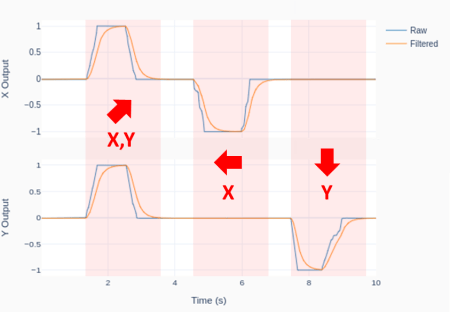
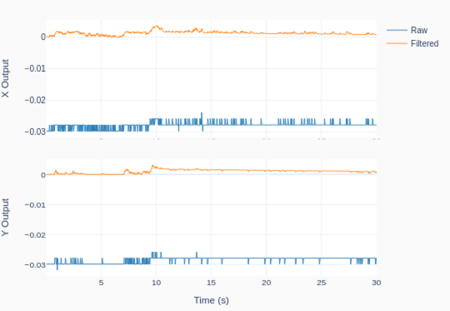
The plot was generated using the Python code below, where a digital low-pass filter with a cutoff frequency of 1Hz was applied to the joystick X and Y output signals. Of course, the cutoff frequency has to be adjusted based on the desired overall system response, which includes what the joystick is controlling.

The outputs were also normalized between -1 and 1. While any transfer function can be designed to map the original 0 to 3.3V range, -1 to 1 seems appropriate if a DC motor is being controlled between full speed reverse and full speed forward.

# Importing modules and classes
import time
import numpy as np
from utils import plot_line
from gpiozero import MCP3008

# Creating ADC channel objects for the joystick inputs
joyLR = MCP3008(channel=0, clock_pin=11, mosi_pin=10, miso_pin=9, select_pin=8)
joyFB = MCP3008(channel=1, clock_pin=11, mosi_pin=10, miso_pin=9, select_pin=8)
# Assigning some parameters
tsample = 0.02  # Sampling period for code execution (s)
tstop = 10  # Total execution time (s)
vref = 3.3  # Reference voltage for MCP3008
# Preallocating output arrays for plotting
t = []  # Time (s)
xLRn = []  # Joy stick X direction output (-1 to 1)
xFBn = []  # Joy stick Y direction output (-1 to 1)
yLRn = []  # Filtered X direction output (-1 to 1)
yFBn = []  # Filtered Y direction output (-1 to 1)

# First order digital low-pass filter parameters
fc = 1  # Filter cutoff frequency (Hz)
tau = 1/(2*np.pi*fc)  # Filter time constant (s)
# Filter difference equation coefficients
a1 = -tau/(tsample+tau)
b0 = tsample/(tsample+tau)
# Initializing filter values
xLR = [joyLR.value]  # x[n]
xFB = [joyFB.value]  # x[n]
yLR = xLR * 2  # y[n], y[n-1]
yFB = yLR * 2  # y[n], y[n-1]
time.sleep(tsample)

# Initializing variables and starting main clock
tprev = 0
tcurr = 0
tstart = time.perf_counter()
# Running execution loop
print('Running code for', tstop, 'seconds ...')
while tcurr <= tstop:
    # Getting current time (s)
    tcurr = time.perf_counter() - tstart
    # Doing I/O and computations every `tsample` seconds
    if (np.floor(tcurr/tsample) - np.floor(tprev/tsample)) == 1:
        # Getting joy stick normalized voltage output
        xLR[0] = joyLR.value
        xFB[0] = joyFB.value
        # Filtering signals
        yLR[0] = -a1*yLR[1] + b0*xLR[0]
        yFB[0] = -a1*yFB[1] + b0*xFB[0]
        # Updating output arrays with normalized output
        t.append(tcurr)
        xLRn.append(-1 + 2*xLR[0])
        xFBn.append(-1 + 2*xFB[0])
        yLRn.append(-1 + 2*yLR[0])
        yFBn.append(-1 + 2*yFB[0])
        # Updating previous filter output values
        yLR[1] = yLR[0]
        yFB[1] = yFB[0]
    # Updating previous time value
    tprev = tcurr

print('Done.')
# Releasing pins
joyLR.close()
joyFB.close()
# Plotting results
plot_line([t]*2, [xLRn, yLRn], yname='X Output', legend=['Raw', 'Filtered'])
plot_line([t]*2, [xFBn, yFBn], yname='Y Output', legend=['Raw', 'Filtered'])

A Note on Joystick Drift

Even though the KS0008 that I used didn’t have a noticeable drift, it is possible that the output values at the “center position” can drift over time. This means that, over time, your system may start moving around, even when it’s supposed to be at rest at the joystick’s “center position”.

One way to address the issue is to use a digital band-pass filter, which attenuates both the low and high frequency content of a signal. Since the lower cutoff frequency will remove the DC component of the signal (the value that is held constant), it has to be chosen carefully depending on the application. If you are controlling an RC car (where there are extended periods of wide-open-throttle conditions), the band-pass filter may start attenuating the WOT value, causing the car to slow down! On the other hand, if you are controlling a drone, where zero-position drifts are highly undesirable, the band-pass filter may be what you need, since there are no extended periods of moving forward-backward or side-to-side.

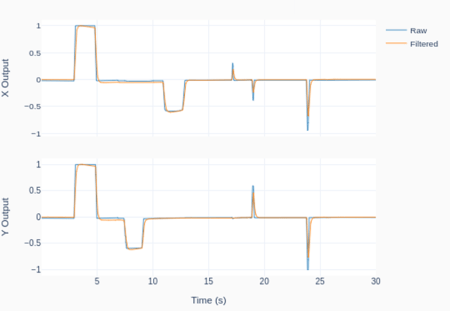
The following Python program implements a digital first-order band-pass filter for the joystick outputs, with low and high cutoff frequencies respectively of 0.005 and 2 Hz. The plots show the joystick’s X-Y motion traces for 30 seconds, as well as the “center-position” rest case. The latter helps illustrate how the DC component of the signal is almost fully removed.

# Importing modules and classes
import time
import numpy as np
from utils import plot_line
from gpiozero import MCP3008

# Creating ADC channel objects for the joystick inputs
joyLR = MCP3008(channel=0, clock_pin=11, mosi_pin=10, miso_pin=9, select_pin=8)
joyFB = MCP3008(channel=1, clock_pin=11, mosi_pin=10, miso_pin=9, select_pin=8)
# Assigning some parameters
tsample = 0.02  # Sampling period for code execution (s)
tstop = 30  # Total execution time (s)
vref = 3.3  # Reference voltage for MCP3008
# Preallocating output arrays for plotting
t = []  # Time (s)
xLRn = []  # Joy stick X direction output (-1 to 1)
xFBn = []  # Joy stick Y direction output (-1 to 1)
yLRn = []  # Filtered X direction output (-1 to 1)
yFBn = []  # Filtered Y direction output (-1 to 1)

# First order digital band-pass filter parameters
fc = np.array([0.005, 2])  # Filter cutoff frequencies (Hz)
tau = 1/(2*np.pi*fc)  # Filter time constants (s)
# Filter difference equation coefficients
a0 = tau[0]*tau[1]+(tau[0]+tau[1])*tsample+tsample**2
a1 = -(2*tau[0]*tau[1]+(tau[0]+tau[1])*tsample)
a2 = tau[0]*tau[1]
b0 = tau[0]*tsample
b1 = -tau[0]*tsample
# Assigning normalized coefficients
a = np.array([1, a1/a0, a2/a0])
b = np.array([b0/a0, b1/a0])
# Initializing filter values
xLR = [joyLR.value] * len(b)  # x[n], x[n-1]
xFB = [joyFB.value] * len(b)  # x[n], x[n-1]
yLR = [0] * len(a)  # y[n], y[n-1], y[n-2]
yFB = [0] * len(a)  # y[n], y[n-1], y[n-2]
time.sleep(tsample)

# Initializing variables and starting main clock
tprev = 0
tcurr = 0
tstart = time.perf_counter()
# Running execution loop
print('Running code for', tstop, 'seconds ...')
while tcurr <= tstop:
    # Getting current time (s)
    tcurr = time.perf_counter() - tstart
    # Doing I/O and computations every `tsample` seconds
    if (np.floor(tcurr/tsample) - np.floor(tprev/tsample)) == 1:
        # Getting joy stick normalized voltage output
        xLR[0] = joyLR.value
        xFB[0] = joyFB.value
        # Filtering signals
        yLR[0] = -np.sum(a[1::]*yLR[1::]) + np.sum(b*xLR)
        yFB[0] = -np.sum(a[1::]*yFB[1::]) + np.sum(b*xFB)
        # Updating output arrays with normalized output
        # (The filtered values have no DC component)
        t.append(tcurr)
        xLRn.append(-1 + 2*xLR[0])
        xFBn.append(-1 + 2*xFB[0])
        yLRn.append(2*yLR[0])
        yFBn.append(2*yFB[0])
        # Updating previous filter output values
        for i in range(len(a)-1, 0, -1):
            yLR[i] = yLR[i-1]
            yFB[i] = yFB[i-1]
        # Updating previous filter input values
        for i in range(len(b)-1, 0, -1):
            xLR[i] = xLR[i-1]
            xFB[i] = xFB[i-1]
    # Updating previous time value
    tprev = tcurr

print('Done.')
# Releasing pins
joyLR.close()
joyFB.close()
# Plotting results
plot_line([t]*2, [xLRn, yLRn], yname='X Output', legend=['Raw', 'Filtered'])
plot_line([t]*2, [xFBn, yFBn], yname='Y Output', legend=['Raw', 'Filtered'])
Motor Speed Control with Raspberry Pi

Motor Speed Control with Raspberry Pi

Let’s use the Motor class with encoder and the Digital PID class to create a closed-loop speed controller for a DC motor. Those two classes have all the required attributes and methods that we need to program an execution loop for a PID controller with very few lines of code.

The starting point is the Raspberry Pi setup that was used to implement encoder capability into the Motor class. I took the artistic liberty to create the diagram below, where I combine visual elements of the PID loop, the hardware connections, and the class methods used for the I/O between the Pi computer and the physical system.

Going back to the concept of execution loops, the I/O tasks are taken care by the Motor class methods get_angle() and set_output(). The computation tasks happening in between are essentially the shaft speed calculation, low-pass filtering, and PID control action. The Python code below implements the execution loop, where the different elements in the Pi box above can be identified. The complete program, which includes the plotting features, along with the Python module with all necessary classes, can be found on my GitHub page.

# Importing modules and classes
import time
import numpy as np
from gpiozero_extended import Motor, PID

# Setting general parameters
tstop = 2  # Execution duration (s)
tsample = 0.01  # Sampling period (s)
wsp = 20  # Motor speed set point (rad/s)
tau = 0.1  # Speed low-pass filter response time (s)

# Creating PID controller object
kp = 0.15
ki = 0.35
kd = 0.01
taupid=0.01
pid = PID(tsample, kp, ki, kd, umin=0, tau=taupid)

# Creating motor object using GPIO pins 16, 17, and 18
# (using SN754410 quadruple half-H driver chip)
# Integrated encoder on GPIO pins 24 and 25.
mymotor = Motor(
    enable1=16, pwm1=17, pwm2=18,
    encoder1=24, encoder2=25, encoderppr=300.8)
mymotor.reset_angle()

# Initializing previous and current values
ucurr = 0  # x[n] (step input)
wfprev = 0  # y[n-1]
wfcurr = 0  # y[n]

# Initializing variables and starting clock
thetaprev = 0
tprev = 0
tcurr = 0
tstart = time.perf_counter()

# Running execution loop
print('Running code for', tstop, 'seconds ...')
while tcurr <= tstop:
    # Pausing for `tsample` to give CPU time to process encoder signal
    time.sleep(tsample)
    # Getting current time (s)
    tcurr = time.perf_counter() - tstart
    # Getting motor shaft angular position: I/O (data in)
    thetacurr = mymotor.get_angle()
    # Calculating motor speed (rad/s)
    wcurr = np.pi/180 * (thetacurr-thetaprev)/(tcurr-tprev)
    # Filtering motor speed signal
    wfcurr = tau/(tau+tsample)*wfprev + tsample/(tau+tsample)*wcurr
    wfprev = wfcurr
    # Calculating closed-loop output
    ucurr = pid.control(wsp, wfcurr)
    # Assigning motor output: I/O (data out)
    mymotor.set_output(ucurr)
    # Updating previous values
    thetaprev = thetacurr
    tprev = tcurr

print('Done.')
# Stopping motor and releasing GPIO pins
mymotor.set_output(0, brake=True)
del mymotor

Motor Speed Filtering

Now that the Python code is laid out, let’s go over some of its components. The motor shaft speed is calculated as the derivative of the angular position of the shaft using a backward difference formula wcurr = np.pi/180 * (thetacurr-thetaprev)/(tcurr-tprev).

The encoder that’s being used has a resolution of encoderppr=300.8, which corresponds to approximately 360/300.8 = 1.2 degrees. The difference between two consecutive time steps tcurr and tprev is about tsample = 0.01 seconds. That gives us a not so great speed resolution of np.pi/180 * (1.2)/(0.01) = 2 rad/s (or 19 rpm!). As a side note, the speed resolution could be improved by increasing either the encoder PPR or the sampling rate. However the first option might reach the limit of the GPIO zero RotaryEncoder class, while the latter will eventually make the closed-loop system unstable. Therefore a compromise has to be reached given the constraints at hand.

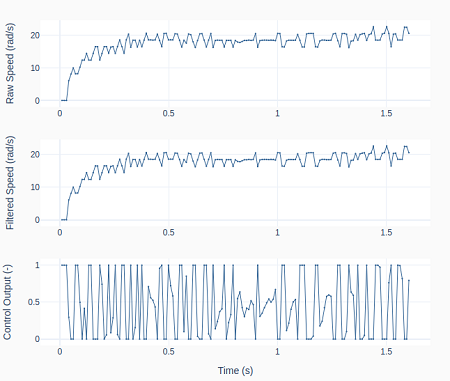
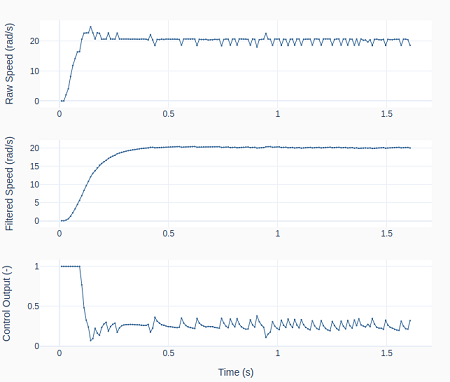
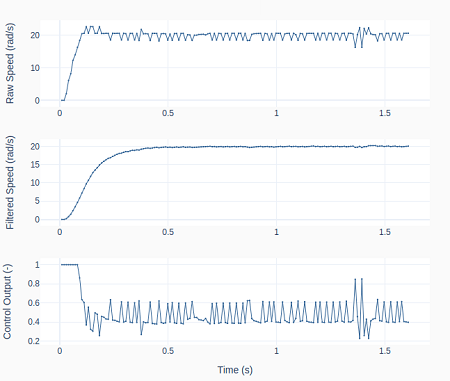
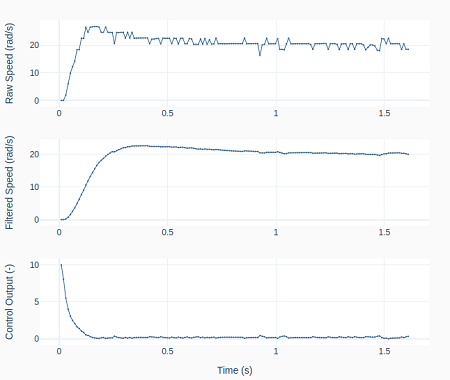
One way reduce the impact of this limitation is to apply a low-pass digital filter to the motor speed signal: wfcurr = tau/(tau+tsample)*wfprev + tsample/(tau+tsample)*wcurr. The graphs below show the raw and the filtered signal as well as the controller output.

On the left, tau = 0 and therefore no filtering is being done. Observe how the controller output bounces between saturation limits. On the right, tau = 0.1, causing the control output to be less erratic, which in turn makes the raw speed more stable. One can also see the “discretization effect” of the 2 rad/s speed resolution on the top row plots.

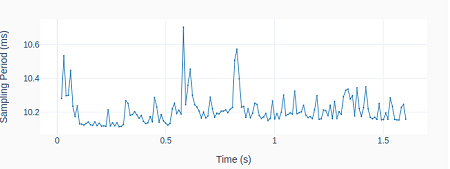
As discussed in the post Encoder with Raspberry Pi, we cannot use a more accurate sampling period during the execution loop due to the intensive computing resources of the RotaryEncoder class.

However, as shown on the left, having to rely on the command time.sleep(tsample) inside the execution loop, still produces repeatability of the sampling period within 1 ms.

PID Derivative Term Filtering

If you notice in the Python code above, I am also filtering the PID derivative when I created the PID class instance: pid = PID(tsample, kp, ki, kd, umin=0, tau=taupid), where taupid = 0.01 seconds.

If we turn it off by making taupid = 0, we obtain the results on the left, where the controller output shows a bigger oscillation amplitude. However, the effect of turning the derivative term filter off is not as pronounced as the effect of not filtering the motor speed signal.

By comparing all the system responses so far, even though the PID gains were never changed from case to case, the closed-loop system response is changing. Ultimately, by adding low-pass filters, the closed-loop dynamic system is different from its original form without the filters.

PID Saturation and Anti-Windup

As it can be seen in the previous graphs, the PID output is saturating right after the step input. We can observe the effect of PID saturation and the integral term windup (which has been avoided so far) by creating the PID class instance: pid = PID(tsample, kp, ki, kd, umin=-10, umax=10, tau=taupid).

Because the controller output (PWM in the Motor class) is in fact limited between -1 and 1, applying -10 and 10 as the new PID controller limits will effectively turn off the anti-windup feature and cause the integral term to wind up.

The plots on the left show the resulting speed overshoot due to that modification as the actual PWM output is saturated at 1.

Final Remarks

We have been building up our knowledge with the previous posts (namely: Encoder with Raspberry Pi, Digital Filtering, and Digital PID Controller) so we could finally run a DC motor in closed-loop speed control. While this could have been achieved from the very beginning, I believe it was more educational to do it in smaller parts through the use of Python classes.

When building more complex automation systems, having a modularized approach with classes that can be tested and used independently, as well as combined in different ways, will make things much easier to tackle in the long run.